> For the complete documentation index, see [llms.txt](https://docs.higiocloud.vn/llms.txt). Markdown versions of documentation pages are available by appending `.md` to page URLs; this page is available as [Markdown](https://docs.higiocloud.vn/hi-gio-user-guide-vn/compute/5.-hi-gio-kms-service.md).
# 5. HI GIO KMS Service
## **Tổng quan**
**HI GIO KMS** được cung cấp bởi giải pháp HashiCorp Vault, được quản lý hoàn toàn bởi các đội ngũ của HI GIO. Vì vậy, khách hàng có thể tập trung vào việc quản lý secret.
{% hint style="info" %}
**HashiCorp Vault** là một hệ thống quản lý *secret* và mã hóa dựa trên danh tính. Một *secret* là bất cứ điều gì bạn muốn kiểm soát quyền truy cập một cách chặt chẽ, chẳng hạn như khóa mã hóa API, mật khẩu và chứng chỉ. Vault cung cấp các dịch vụ mã hóa được bảo vệ bởi các phương thức xác thực và ủy quyền. Quyền truy cập vào *secret* và các dữ liệu nhạy cảm khác có thể được lưu trữ và quản lý một cách an toàn, được kiểm soát chặt chẽ (hạn chế) và có thể kiểm tra được thông qua giao diện người dùng Vault (UI), CLI, hoặc API HTTP.
{% endhint %}
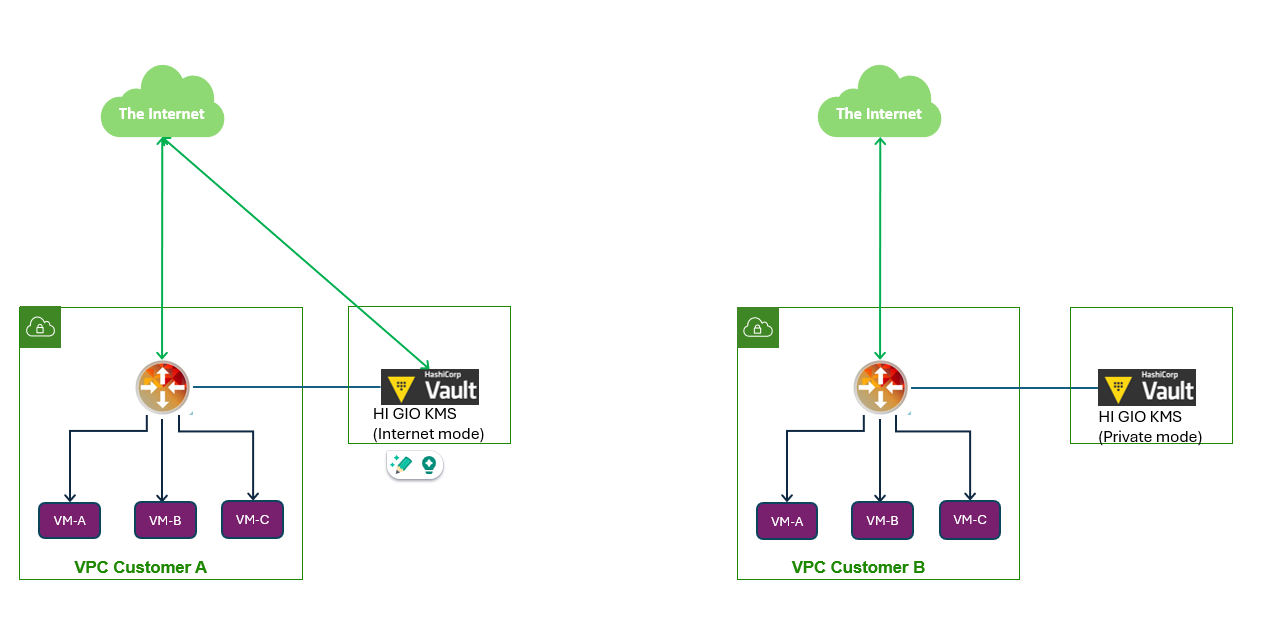
HI GIO KMS có hai mô hình triển khai:
* Internet mode
* Private mode (Chỉ có thể truy cập từ hệ thống VPC HI GIO của khách hàng)
Reference:
[Tutorials | Vault | HashiCorp Developer](https://developer.hashicorp.com/vault/tutorials)
---
# Agent Instructions
This documentation is published with GitBook. GitBook is the documentation platform designed so that both humans and AI agents can read, navigate, and reason over technical content effectively. Learn more at gitbook.com.
## Querying This Documentation
If you need additional information that is not directly available in this page, you can query the documentation by asking a question.
Perform an HTTP GET request on the following URL with the `ask` and `goal` query parameters:
```
GET https://docs.higiocloud.vn/hi-gio-user-guide-vn/compute/5.-hi-gio-kms-service.md?ask=&goal=
```
`ask` is the immediate question: it should be specific, self-contained, and written in natural language.
`goal` is what the user is ultimately trying to achieve, the reason they need the answer. Sharing it helps GitBook give you a better, more relevant answer. A goal is most helpful when it describes the outcome the user wants rather than restating the question. For example, with `ask=how do I create an API token`, a goal like `automate deployments from our CI pipeline` lets GitBook tailor the answer to that use case.
The response will contain a direct answer to the question and relevant excerpts and sources from the documentation.
Use this mechanism when the answer is not explicitly present in the current page, you need clarification or additional context, or you want to retrieve related documentation sections.