> For the complete documentation index, see [llms.txt](https://docs.higiocloud.vn/llms.txt). Markdown versions of documentation pages are available by appending `.md` to page URLs; this page is available as [Markdown](https://docs.higiocloud.vn/hi-gio-user-guide-vn/hi-gio-draas/kich-ban-failover/failover/faqs.md).
# FAQs
Các vấn đề thường gặp và giải pháp
1. **Không thấy các backup jobs trên On-Premises Site**
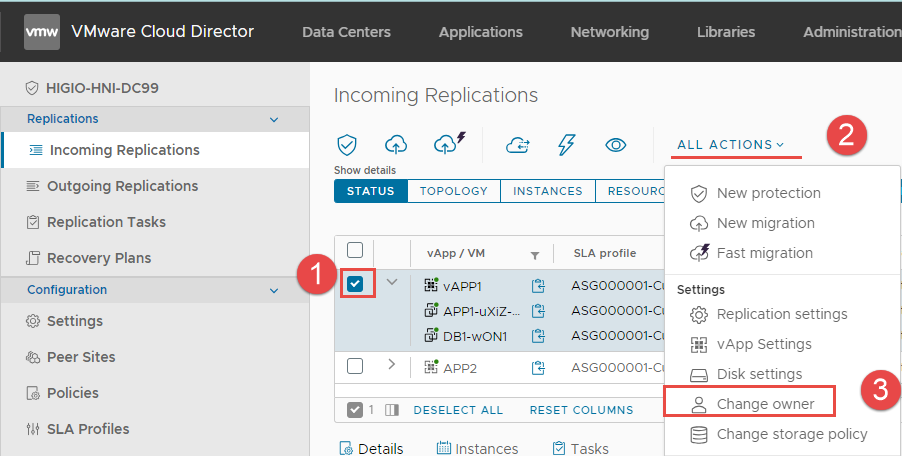
Sau khi tạo protection job hoặc reverse job trên HI GIO Cloud (bằng tài khoản provider), các job này không hiển thị trên On-Premises Site.
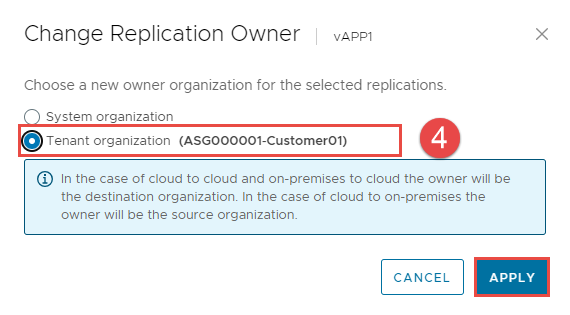
**Giải pháp:** Chuyển quyền sở hữu (owner) của các job này về tenant organization.
2. **Yêu cầu Virtual Machine Disk Consolidation**
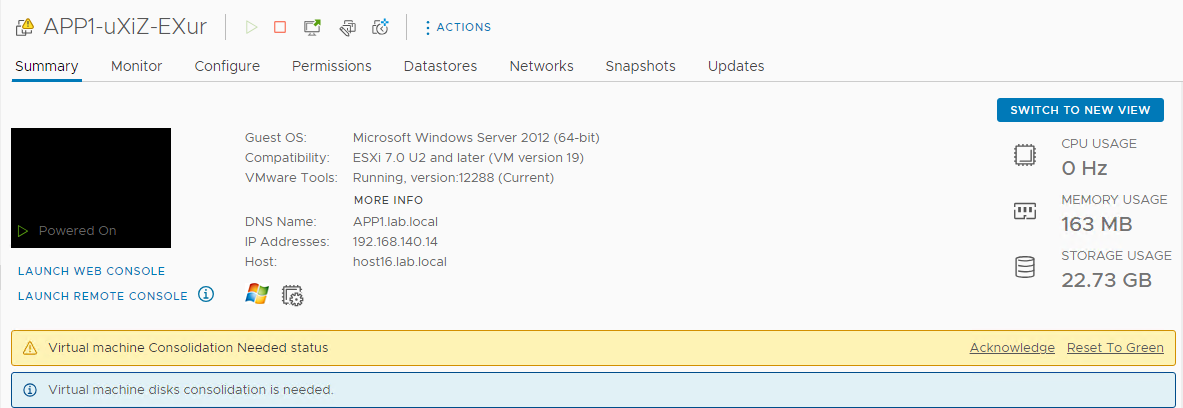
Việc di chuyển VMs từ HI GIO Cloud về On-Premises có thể gây ra cảnh báo "Virtual Machine Disk Consolidation is needed."
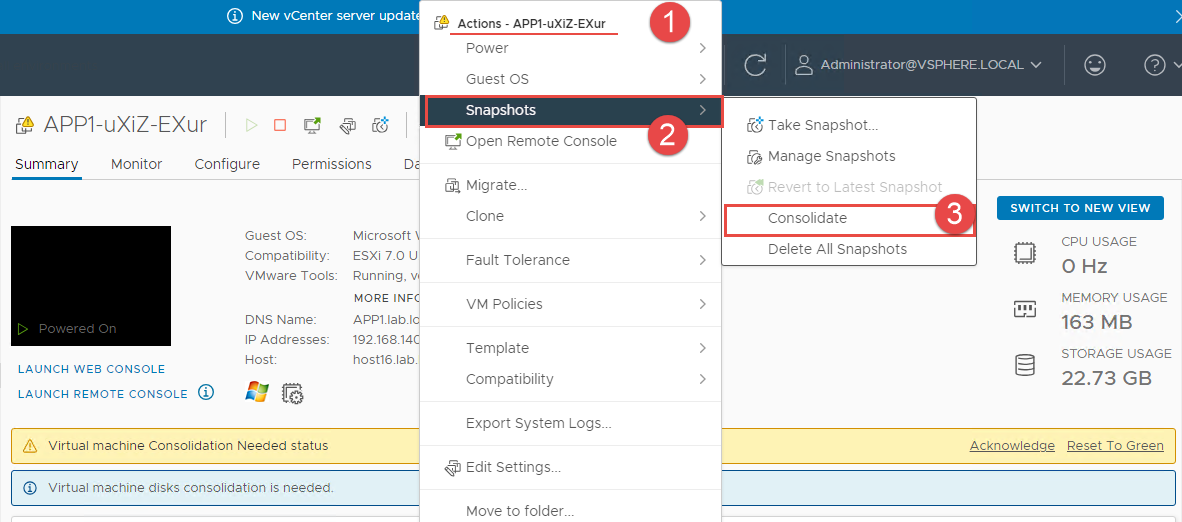
**Giải pháp:** Thực hiện **Consolidation** cho các VMs.
3. **Lỗi trên Windows server - mất trust relationship sau khi migrate VM tới HI GIO cloud hoặc migrate VM trở lại site on-premises.**
* **Giải pháp**: Làm theo hướng dẫn từ Microsoft
* **Lưu ý:** Bạn có thể cấu hình thời gian tối đa cho mật khẩu máy tính bằng **Domain member: Maximum machine account password age** policy ở Computer Configuration-> Windows Settings-> Security Settings-> Local Policies-> Security Options. **Thời gian tuổi thọ mật khẩu** có thể đặt từ 0 đến 999 ngày (mặc định là 30 ngày).
---
# Agent Instructions
This documentation is published with GitBook. GitBook is the documentation platform designed so that both humans and AI agents can read, navigate, and reason over technical content effectively. Learn more at gitbook.com.
## Querying This Documentation
If you need additional information that is not directly available in this page, you can query the documentation by asking a question.
Perform an HTTP GET request on the following URL with the `ask` and `goal` query parameters:
```
GET https://docs.higiocloud.vn/hi-gio-user-guide-vn/hi-gio-draas/kich-ban-failover/failover/faqs.md?ask=&goal=
```
`ask` is the immediate question: it should be specific, self-contained, and written in natural language.
`goal` is what the user is ultimately trying to achieve, the reason they need the answer. Sharing it helps GitBook give you a better, more relevant answer. A goal is most helpful when it describes the outcome the user wants rather than restating the question. For example, with `ask=how do I create an API token`, a goal like `automate deployments from our CI pipeline` lets GitBook tailor the answer to that use case.
The response will contain a direct answer to the question and relevant excerpts and sources from the documentation.
Use this mechanism when the answer is not explicitly present in the current page, you need clarification or additional context, or you want to retrieve related documentation sections.