> For the complete documentation index, see [llms.txt](https://docs.higiocloud.vn/llms.txt). Markdown versions of documentation pages are available by appending `.md` to page URLs; this page is available as [Markdown](https://docs.higiocloud.vn/hi-gio-user-guide-vn/hi-gio-s3-storage/quan-ly-tep-thu-muc/lay-lien-ket-tai-xuong-cua-tep.md).
# Lấy liên kết tải xuống của tệp
## **Tổng quan**
Để tải xuống files từ HI GIO S3, hãy tạo một pre-signed URL. Liên kết này cung cấp quyền truy cập tạm thời, cho phép người dùng tải xuống files một cách an toàn mà không cần thông tin đăng nhập HI GIO S3.
## Quy trình
{% stepper %}
{% step %}
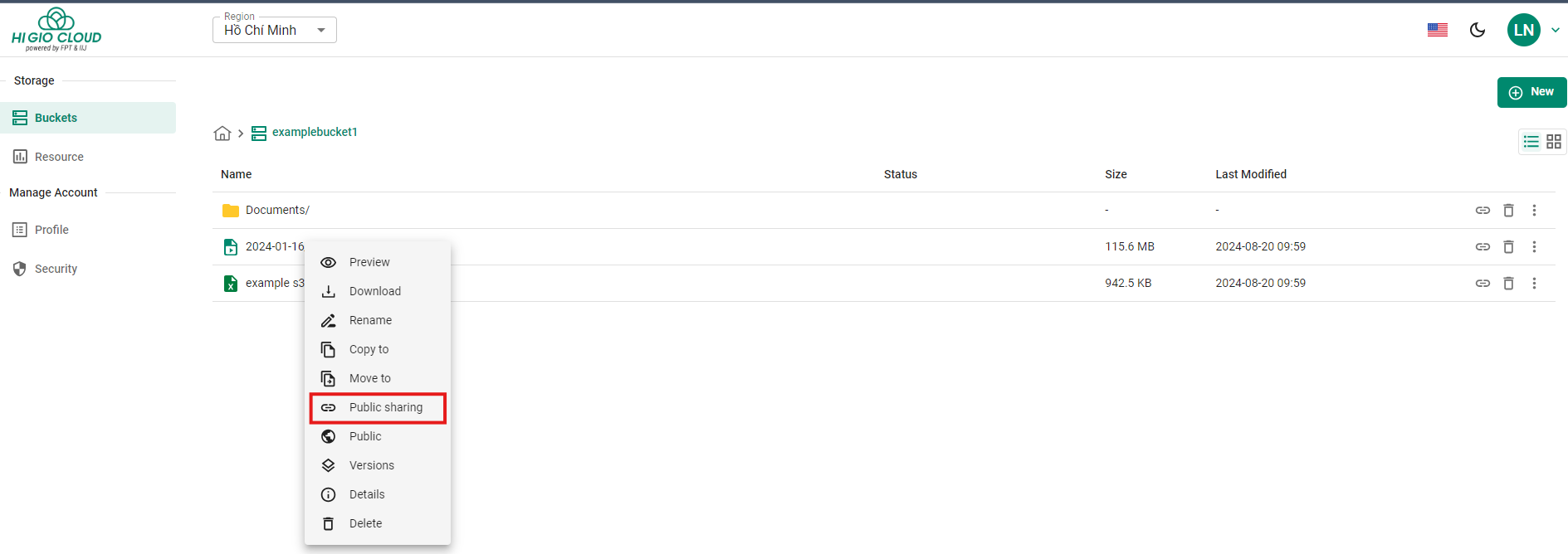
Bước 1: Nhấp chuột phải vào File bạn cần lấy liên kết và chọn “**Public Sharing**”.
{% endstep %}
{% step %}
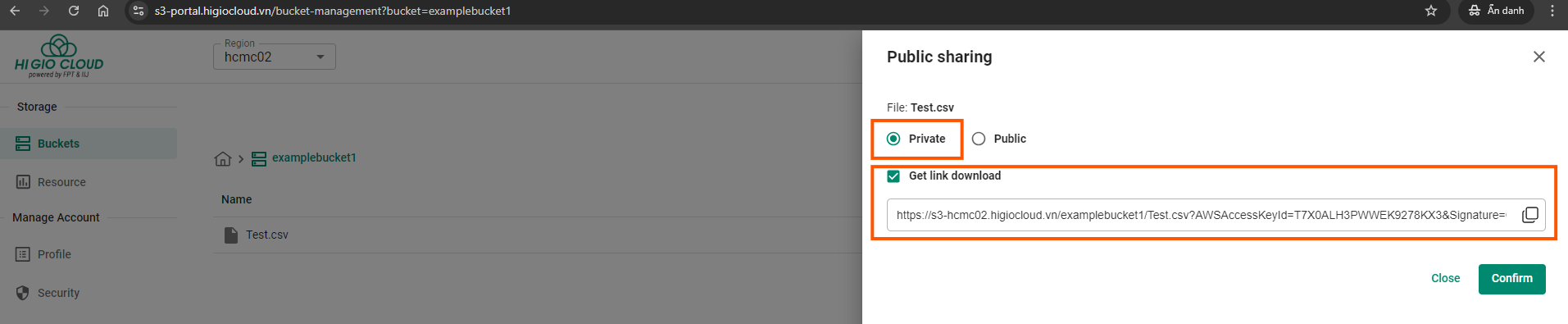
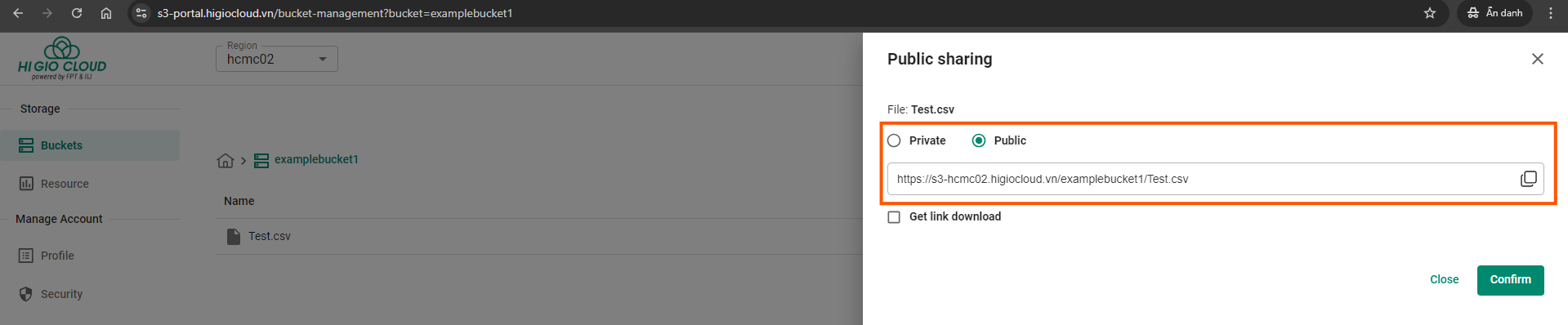
Bước 2: Trong HI GIO S3, bạn có thể đặt chế độ chia sẻ của các objects thành **Private** hoặc **Public**.
* **Private Mode**: Tất cả các buckets và objects của HI GIO S3 đều ở chế độ private theo mặc định. Chỉ chủ sở hữu bucket có quyền truy cập, đảm bảo an toàn dữ liệu.
* **Get link download** option: URL này cấp quyền truy cập tạm thời vào file private, cho phép người dùng tải xuống mà không cần thông tin đăng nhập HI GIO S3 trong vòng 60 phút.
* **Public Mode**: Nếu bạn muốn chia sẻ các objects công khai, bạn có thể cấu hình quyền của bucket hoặc object để cho phép truy cập công khai. Điều này cho phép bất kỳ ai có liên kết đều có thể xem hoặc tải xuống các files. Cần sử dụng chế độ này một cách thận trọng để tránh truy cập trái phép vào dữ liệu nhạy cảm.
{% endstep %}
{% endstepper %}
---
# Agent Instructions
This documentation is published with GitBook. GitBook is the documentation platform designed so that both humans and AI agents can read, navigate, and reason over technical content effectively. Learn more at gitbook.com.
## Querying This Documentation
If you need additional information that is not directly available in this page, you can query the documentation dynamically by asking a question.
Perform an HTTP GET request on the current page URL with the `ask` query parameter, and the optional `goal` query parameter:
```
GET https://docs.higiocloud.vn/hi-gio-user-guide-vn/hi-gio-s3-storage/quan-ly-tep-thu-muc/lay-lien-ket-tai-xuong-cua-tep.md?ask=&goal=
```
`ask` is the immediate question: it should be specific, self-contained, and written in natural language.
`goal` is optional and describes the broader end goal you are ultimately trying to accomplish on behalf of the user. GitBook uses it to tailor the answer towards what is most useful for that goal.
The response will contain a direct answer to the question and relevant excerpts and sources from the documentation.
Use this mechanism when the answer is not explicitly present in the current page, you need clarification or additional context, or you want to retrieve related documentation sections.