> For the complete documentation index, see [llms.txt](https://docs.higiocloud.vn/llms.txt). Markdown versions of documentation pages are available by appending `.md` to page URLs; this page is available as [Markdown](https://docs.higiocloud.vn/hi-gio-user-guide-vn/management/1.-iam-portal/canh-bao-giam-sat-hi-gio-kenh-thong-bao-qua-telegram.md).
# Cảnh Báo Giám Sát HI GIO - Kênh Thông Báo qua Telegram
## **Tổng quan**
Chức năng này cho phép người dùng tạo các quy tắc nhận thông báo qua kênh Telegram khi trạng thái của các VM vượt quá hoặc giảm xuống dưới các ngưỡng cụ thể.
## Quy trình
{% tabs %}
{% tab title="I. Cách lấy BOT API TOKEN và Chat ID của Telegrambot" %}
#### Hãy xem đường dẫn này để tìm hiểu cách lấy [BOT API TOKEN](https://gist.github.com/nafiesl/4ad622f344cd1dc3bb1ecbe468ff9f8a#create-a-telegram-bot-and-get-a-bot-token) và [Chat ID](https://stackoverflow.com/questions/32423837/telegram-bot-how-to-get-a-group-chat-id)
{% endtab %}
{% tab title="II. Tạo Điểm Đến Cảnh Báo sử dụng kênh thông báo Telegram" %}
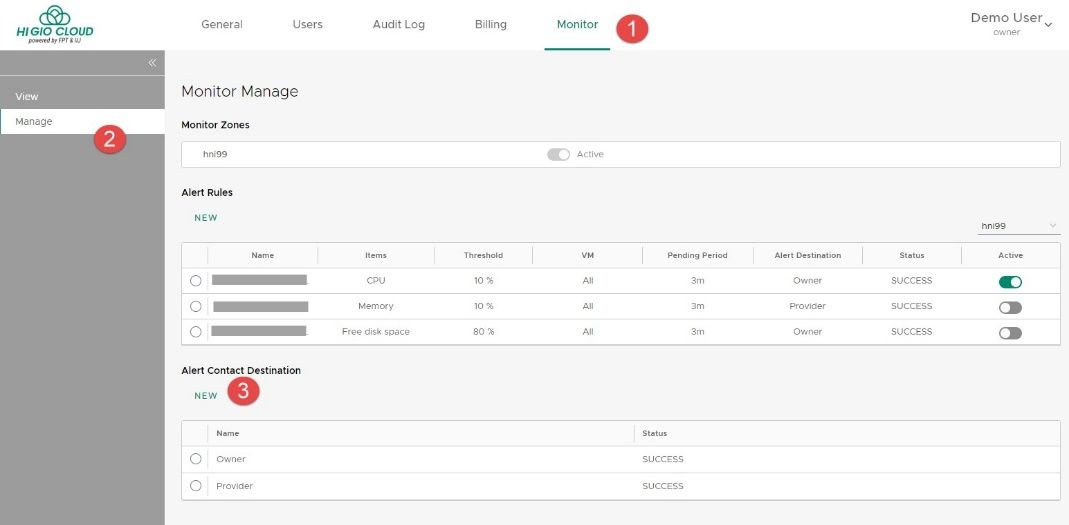
**Bước 1:** Đăng nhập vào **HI GIO cloud** > **Monitor**.
**Bước 2:** Chọn **Manage**, và chọn **NEW** dưới phần **Alert Contact Destination**.
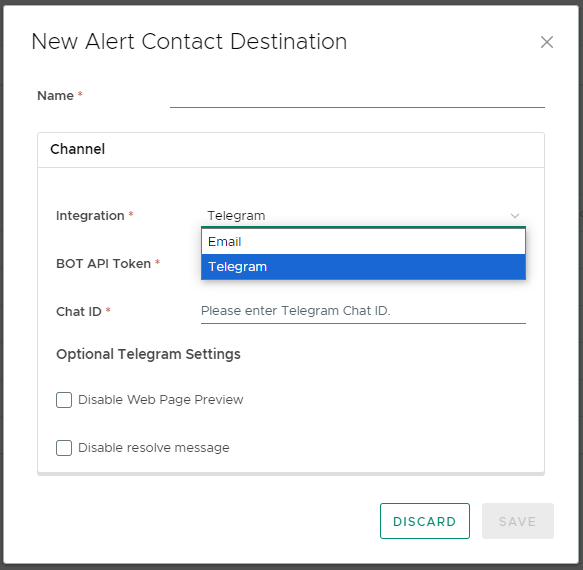
* Cửa sổ **Alert Contact Destination** mới sẽ mở ra.
* Chọn **Integration** là **Telegram**.
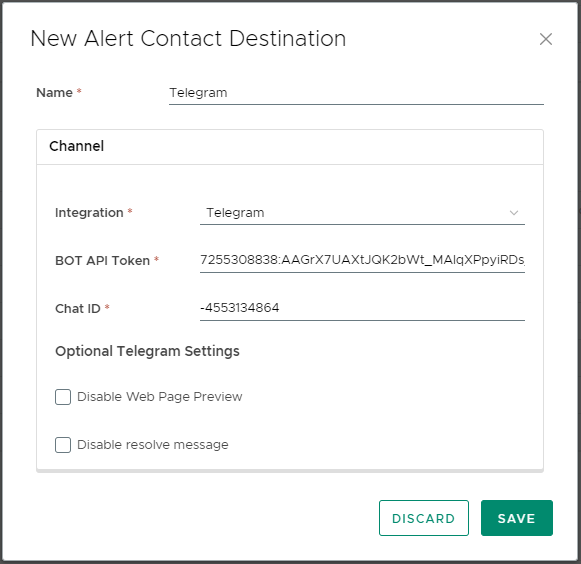
* Điền thông tin liên lạc vào cửa sổ này > **SAVE**.
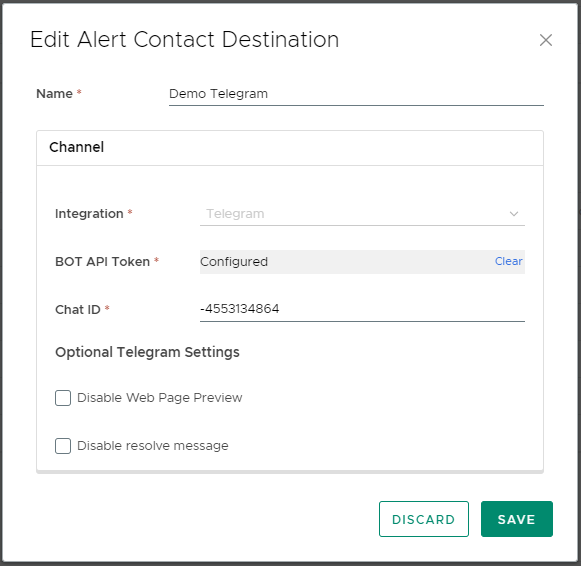
* Thông tin **BOT API Token** sẽ bị ẩn trong biểu mẫu chỉnh sửa.
**Giải thích các trường:**
***Name:*** Tên của điểm đến cảnh báo.
***Integration:*** Kênh mà người dùng có thể nhận thông báo. Trong phiên bản này, có 3 kênh có sẵn: **Email** và **Telegram**.
***BOT API Token:*** Token để truy cập BOT API.
***Chat ID:*** ID của Group Chat trên Telegram.
Tùy Chọn ***Webhook Settings:***
*+ Disable Web Page Preview:* Nếu tùy chọn này được chọn, phần xem trước trang web sẽ bị ẩn trong nội dung thông báo.
*+ Disable resolve message:* Thông báo "resolved" sẽ không được gửi nếu tùy chọn này được chọn.
* Sau khi hoàn thành, **Alert Contact Destination** sẽ hiển thị như sau:
{% endtab %}
{% tab title="III. Tạo Quy Tắc Cảnh Báo sử dụng kênh thông báo Telegram" %}
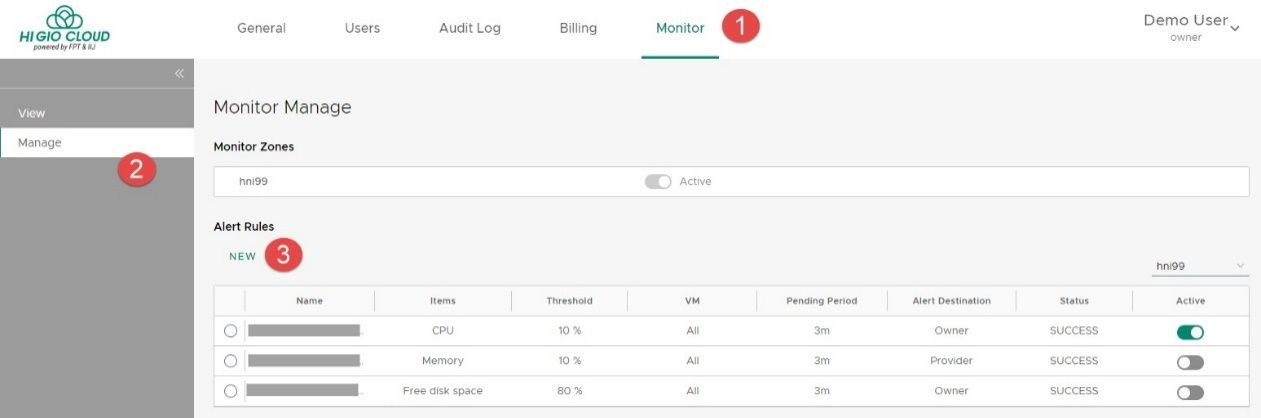
**Bước 1**: Đăng nhập vào **HI GIO cloud** > **Monitor**.
**Bước 2:** Chọn **Manage**, và chọn **NEW** dưới phần **Alert Rules**.
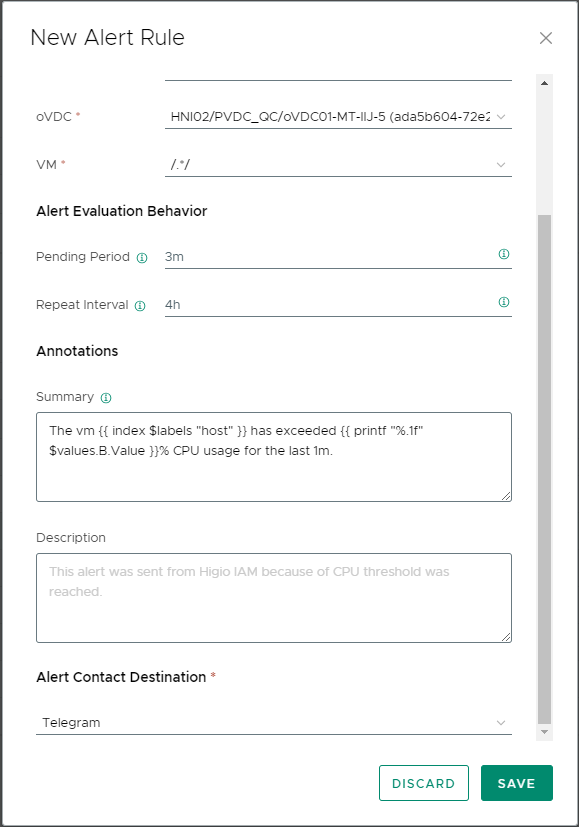
* Cửa sổ **Alert Rule mới** sẽ mở ra.
* Điền thông tin vào cửa sổ này và chọn **Alert Contact Destination** sử dụng kênh thông báo Telegram > **SAVE**.
* Sau khi hoàn thành, **Alert Rule** sẽ hiển thị như sau:
{% endtab %}
{% tab title="IV. Thông Báo Qua Telegram" %}
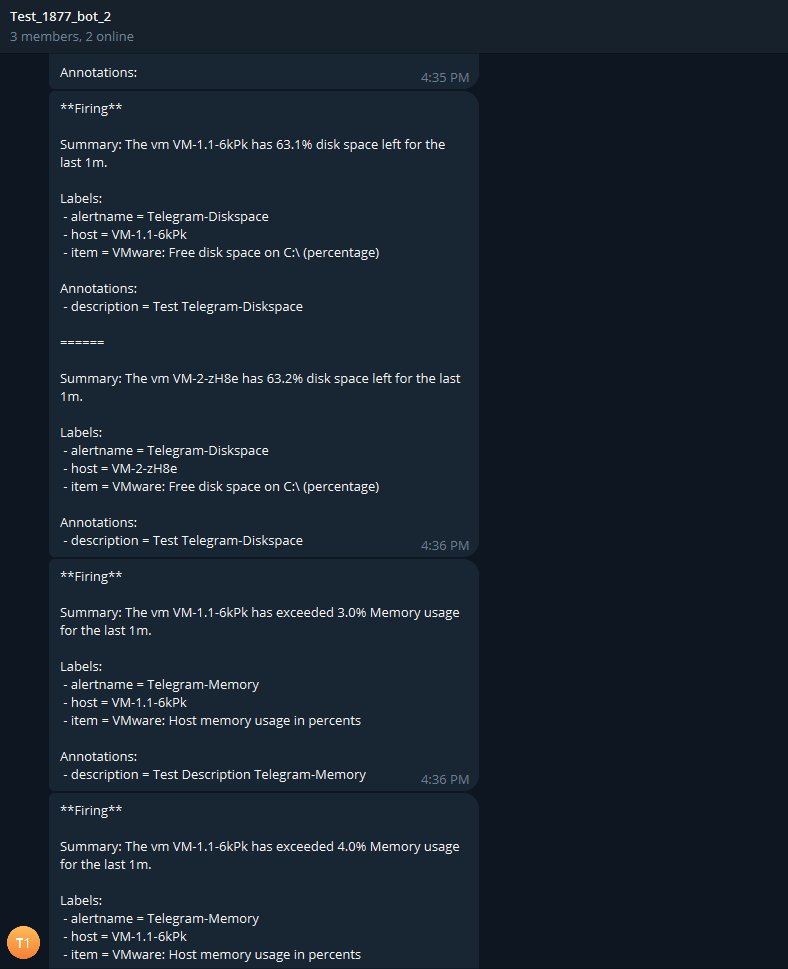
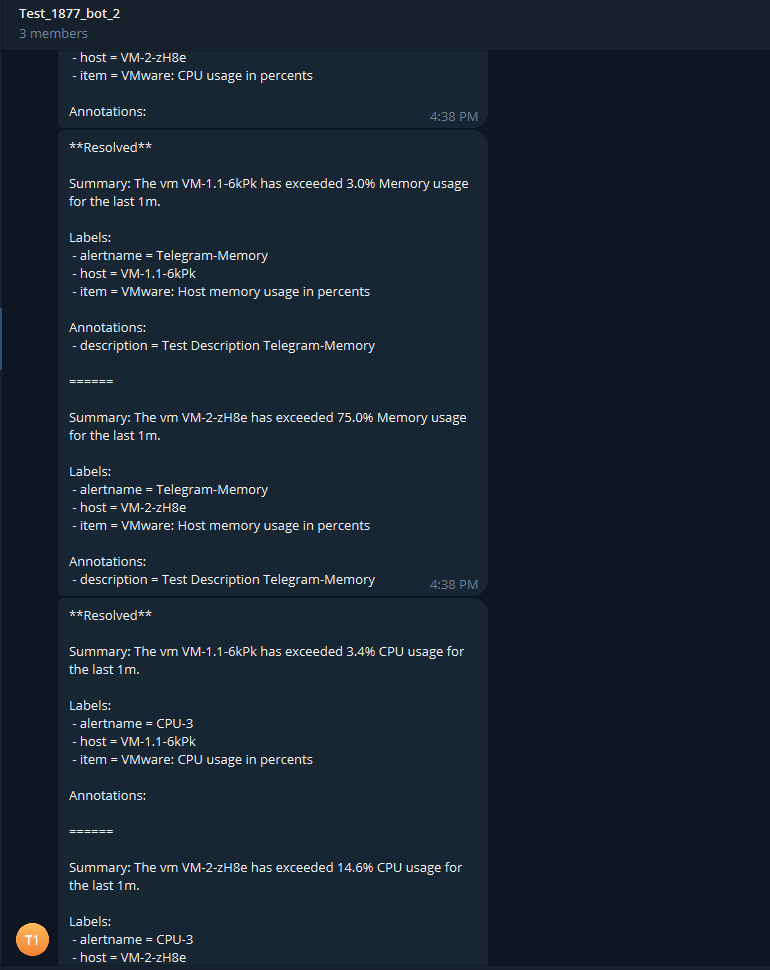
Bất cứ khi nào ngưỡng được định nghĩa trong quy tắc cảnh báo được đạt tới, bạn sẽ nhận được thông báo Telegram cho biết các **Firing Instances** hoặc **Resolved Instances**.
* Ví dụ Telegram – Firing Instance
* Ví dụ Telegram – Resolved Instance
{% endtab %}
{% endtabs %}
---
# Agent Instructions
This documentation is published with GitBook. GitBook is the documentation platform designed so that both humans and AI agents can read, navigate, and reason over technical content effectively. Learn more at gitbook.com.
## Querying This Documentation
If you need additional information that is not directly available in this page, you can query the documentation dynamically by asking a question.
Perform an HTTP GET request on the current page URL with the `ask` query parameter, and the optional `goal` query parameter:
```
GET https://docs.higiocloud.vn/hi-gio-user-guide-vn/management/1.-iam-portal/canh-bao-giam-sat-hi-gio-kenh-thong-bao-qua-telegram.md?ask=&goal=
```
`ask` is the immediate question: it should be specific, self-contained, and written in natural language.
`goal` is optional and describes the broader end goal you are ultimately trying to accomplish on behalf of the user. GitBook uses it to tailor the answer towards what is most useful for that goal.
The response will contain a direct answer to the question and relevant excerpts and sources from the documentation.
Use this mechanism when the answer is not explicitly present in the current page, you need clarification or additional context, or you want to retrieve related documentation sections.