> For the complete documentation index, see [llms.txt](https://docs.higiocloud.vn/llms.txt). Markdown versions of documentation pages are available by appending `.md` to page URLs; this page is available as [Markdown](https://docs.higiocloud.vn/hi-gio-user-guide-vn/management/1.-iam-portal/giam-sat-may-ao-hi-gio.md).
# Giám sát Máy Ảo HI GIO
## **Tổng quan**
Chức năng này cung cấp cho người dùng/nhà cung cấp dịch vụ của tenant một cái nhìn trực quan về trạng thái của từng máy ảo (VM) dựa trên các chỉ số sau:
*o **CPU** Usage.*
*o **Memory** Usage.*
*o **Disk** used Space.*
*o **Disk** Average number of bytes read.*
*o **Disk** Average number of bytes written.*
*o **Network** utilization on interfaces.*
Hướng dẫn này sẽ giúp bạn:
* Cách kích hoạt Monitor Zones.
* Cách xem các monitor item trên tổ chức của bạn.
## Quy trình
{% stepper %}
{% step %}
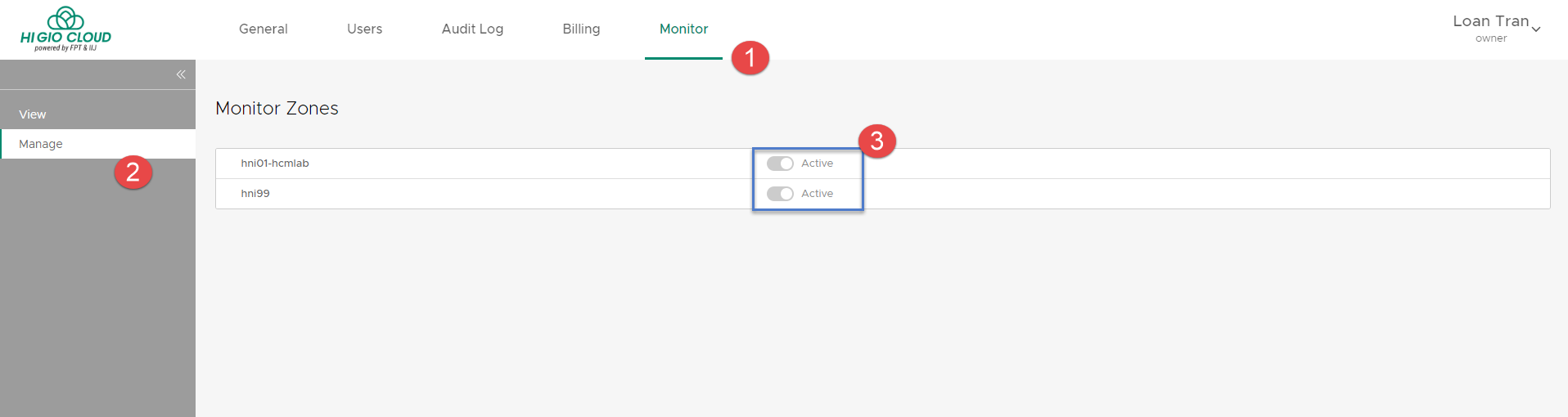
**Bước 1: Kích hoạt Monitor Zones**
Trang này liệt kê tất cả các vùng (region) quản lý của tài khoản bạn và cho phép bạn kích hoạt giám sát cho chúng.
Đăng nhập vào IAM portal. Chọn **Monitor > Manage**
Chọn *Zone* > Chuyển thành **Active**
{% endstep %}
{% step %}
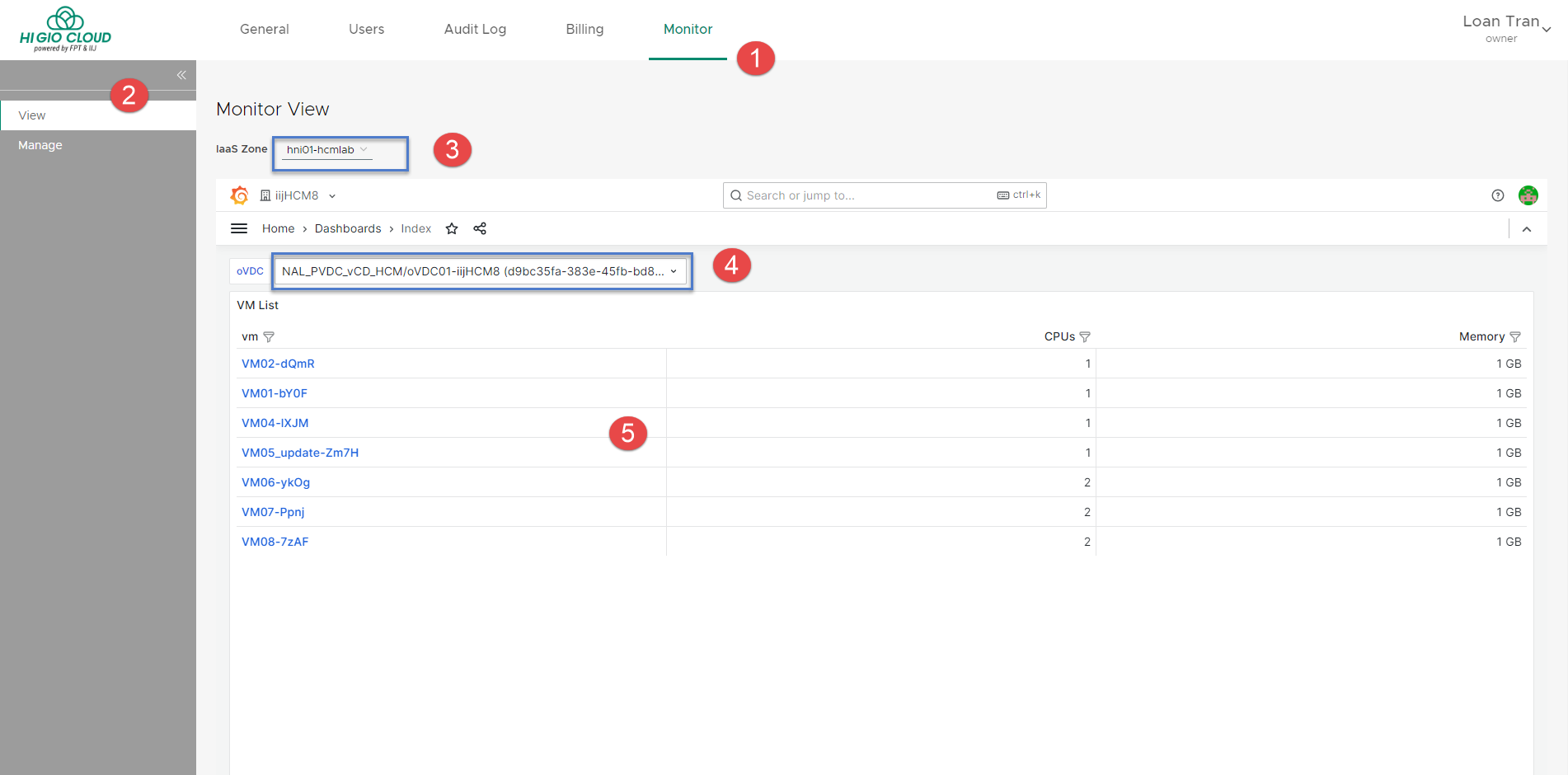
**Bước 2: Xem các monitor items trong tổ chức của bạn**
Đăng nhập vào IAM portal. Chọn **Monitor > View.**
Trong cửa sổ **Monitor View**, bạn có thể chọn: IaaS Zone *\[3]*, oVDC *\[4]* mà bạn muốn xem.
Chọn tên VM từ danh sách \[5] để mở các mục giám sát của VM.
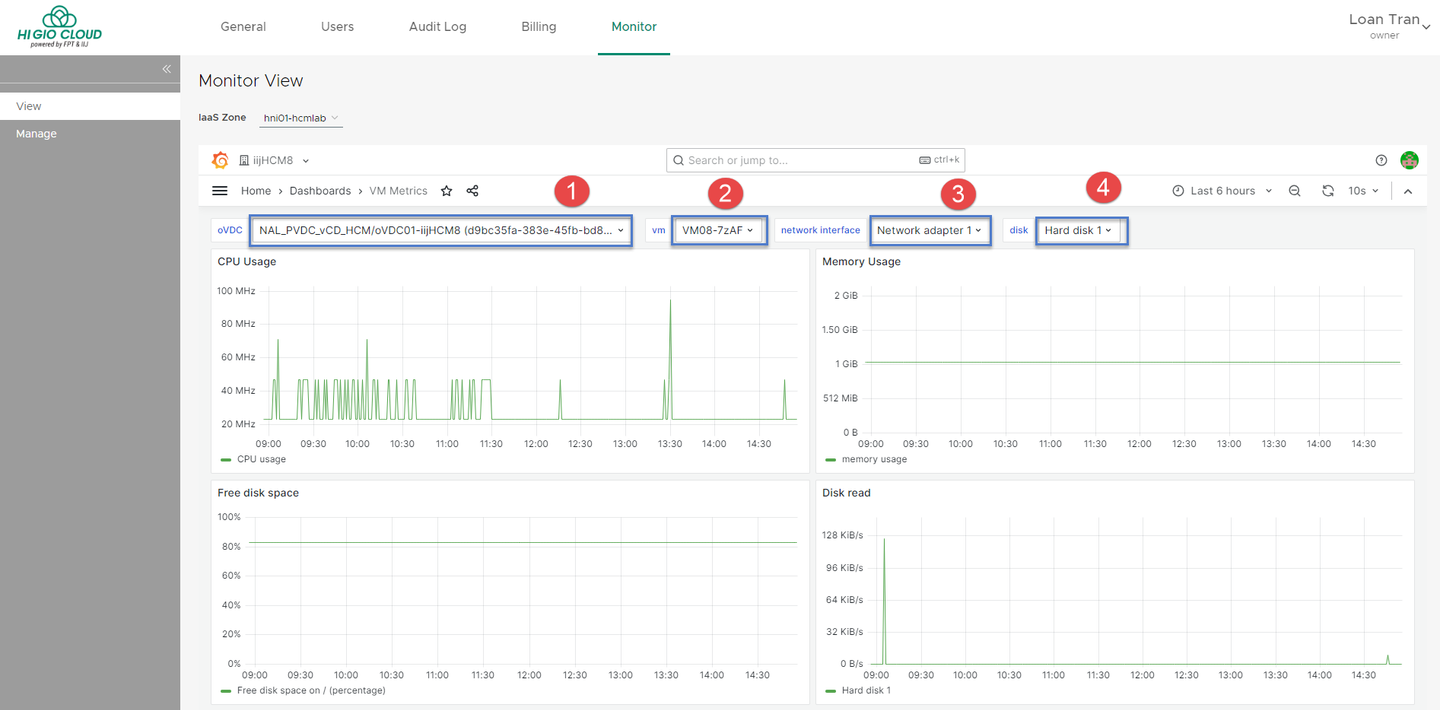
Trên trang này, bạn có thể chọn:
*\[1]* oVDC
*\[2]* VM
*\[3]* Network (nếu VM có nhiều NIC)
*\[4]* Disk (nếu VM có nhiều đĩa)
{% endstep %}
{% endstepper %}
---
# Agent Instructions
This documentation is published with GitBook. GitBook is the documentation platform designed so that both humans and AI agents can read, navigate, and reason over technical content effectively. Learn more at gitbook.com.
## Querying This Documentation
If you need additional information that is not directly available in this page, you can query the documentation dynamically by asking a question.
Perform an HTTP GET request on the current page URL with the `ask` query parameter, and the optional `goal` query parameter:
```
GET https://docs.higiocloud.vn/hi-gio-user-guide-vn/management/1.-iam-portal/giam-sat-may-ao-hi-gio.md?ask=&goal=
```
`ask` is the immediate question: it should be specific, self-contained, and written in natural language.
`goal` is optional and describes the broader end goal you are ultimately trying to accomplish on behalf of the user. GitBook uses it to tailor the answer towards what is most useful for that goal.
The response will contain a direct answer to the question and relevant excerpts and sources from the documentation.
Use this mechanism when the answer is not explicitly present in the current page, you need clarification or additional context, or you want to retrieve related documentation sections.